Showing posts with label MySQL. Show all posts

Tuesday, April 6, 2021

How to Install innotop in linux?

Innotop is an efficient command-line monitoring tool for local and remote MySQL servers running under Innodb. It helps to monitoring several operations like MySQL replication status, user statistics, query list, InnoDB buffers, InnoDB I/O information etc.


To Install Innotop


Run the following command to install Innotop


In RedHat


yum install innotop


In Ubuntu


Fetch innotop from its GIT repository:


Install Perl dependency:


sudo apt install libterm-readkey-perl libclass-dbi-perl libclass-dbi-mysql-perl make 


sudo apt-get install git

git clone https://github.com/innotop/innotop.git


Or 


wget https://github.com/innotop/innotop/archive/refs/heads/master.zip


cd innotop/

perl Makefile.PL


Note:If there no warnings and errors (in case you have to fix other dependencies), proceed with the installation of this good MySQL InnoDB real-time monitor:


sudo make install


Innotop can be launched in several ways, the easiest is to provide, on the command line, username and password (with -u [user] and -p [password]) of a privileged user.


Syntax:


sudo innotop -uuser -ppassword


Now the terminal will be logged in.



Press " ?" help symbol to view the various option available.


To Monitor the remote mysql server


If you want to monitor the remote mysql server, run the below command. Login the remote mysql server enter the mysql username, password and hostname.


sudo innotop -uuser -ppassword -hip_address


Monday, June 15, 2020

How to dump the database with triggers and procedures?


Stored procedures and Triggers are first introduced with MySQL 5.0. So if you are still using MySQL older version’s upgrade it to MySQL 5.0 or higher version to use these features.


What is Stored Procedure ?


A stored procedure, by definition, is a segment of declarative SQL code which is stored in the database catalog and can be invoked later by a program, a trigger or even a stored procedure.


What is Triggers ?


Triggers are event-driven specialized procedures, they are stored in and managed by the database. A trigger is a SQL procedure that initiates an action on an event (Like INSERT, DELETE or UPDATE) occurs.


mysqldump will backup by default all the triggers but NOT the stored procedures/functions. There are 2 mysqldump parameters that control this behavior:


--routines - FALSE by default

--triggers - TRUE by default


This means that if you want to include in an existing backup script also the triggers and stored procedures you only need to add the --routines command line parameter:


Backup Stored Procedures and Routines


We need to specify --routines to take backup of stored procedures with data and tables.


The following command will take backup of entire database including stored procedures. For example, your database name is “mydb”.


mysqldump -u root -p --routines mydb > mydb.sql


To take backup of only Stored Procedures and Triggers (Exclude table and data ) use the following command.


mysqldump --routines --no-create-info --no-data --no-create-db --skip-opt mydb > mydb.sql


To Take backup without triggers use following command

mysqldump -uroot -p --skip-triggers mydb> mydb.sql

Restore Procedures


To restore stored procedures in the database simply use the following command, But make sure you have taken backup properly before restoring it to avoid any data loss.


mysql -u root -p mydb < mydb.sql


Sunday, May 5, 2019

How do I kill all the processes in MySQL show processlist?

How do I kill a running query in mysql ?


We can kill the processes with the help of the ‘kill’ command. However, you need to
kill those processes one by one, since MySQL does not have any massive kill command.


To check how many processes exist, use ‘show processlist’


The following is the output.


mysql> show processlist;
+------+--------+--------------------+----------+---------+------+-------+------------------+
| Id   | User  | Host            | db | Command | Time | State | Info             |
+------+--------+--------------------+----------+---------+------+-------+------------------+
|   41 | zabbix | localhost          | zabbixdb | Sleep | 2 |   | NULL |
|   48 | zabbix | localhost          | zabbixdb | Sleep | 0 |   | NULL |
|   50 | zabbix | localhost          | zabbixdb | Sleep | 29 |   | NULL |
|   55 | zabbix | localhost          | zabbixdb | Sleep | 0 |   | NULL |
|   58 | zabbix | localhost          | zabbixdb | Sleep | 1 |   | NULL |
|   62 | zabbix | localhost          | zabbixdb | Sleep | 57 |   | NULL |
| 5280 | root   | 192.168.109.202:58608 | zabbixdb | Query   | 0 | NULL | show processlist |
+------+--------+--------------------+----------+---------+------+-------+------------------+
7 rows in set (0.00 sec)


To kill a process which have been active for more than 10 seconds, the following is the query. Here, we are killing a process with Id “41”


mysql> select concat('kill ',41,';')
  -> from information_schema.processlist
  -> where TIME > 10;


The following is the output.


mysql> select concat('kill ',41,';')  from information_schema.processlist where TIME > 10;
+------------------------+
| concat('kill ',41,';') |
+------------------------+
| kill 41;               |
| kill 41;               |
| kill 41;               |
| kill 41;               |
+------------------------+
4 rows in set (0.00 sec)
Method 2:


kill <thread_id>;


mysql> show processlist;
+------+--------+--------------------+----------+---------+------+-------+------------------+
| Id   | User  | Host            | db | Command | Time | State | Info             |
+------+--------+--------------------+----------+---------+------+-------+------------------+
|   48 | zabbix | localhost          | zabbixdb | Sleep | 3 |   | NULL |
|   50 | zabbix | localhost          | zabbixdb | Sleep | 23 |   | NULL |
|   55 | zabbix | localhost          | zabbixdb | Sleep | 4 |   | NULL |
|   58 | zabbix | localhost          | zabbixdb | Sleep | 55 |   | NULL |
|   62 | zabbix | localhost          | zabbixdb | Sleep | 51 |   | NULL |
| 5280 | root   | 192.168.109.202:58608 | zabbixdb | Query   | 0 | NULL | show processlist |
| 5355 | zabbix | localhost          | zabbixdb | Sleep | 26 | | NULL             |
+------+--------+--------------------+----------+---------+------+-------+------------------+
7 rows in set (0.00 sec)


mysql> kill 5355  ;


Query OK, 0 rows affected (0.00 sec)


you can still try the following MySQL query to kill all the processes.


mysql -e "show full processlist;" -ss | awk '{print "KILL "$1";"}'


Wednesday, March 27, 2019

How do I increase the MySQL connections for my server?

These following reasons cause MySQL to run out connections.

1). Slow Queries

2). Data Storage Techniques

3). Bad MySQL configuration


If you have encountered the error “Too many connections” while trying to connect to a MySQL
Server, that means it reached the maximum number of connections, or all available permitted are in
use by other clients and your connection attempts will get rejected.

That number of connections is defined via the max_connections system variable. To open for more
connections, you can set a higher value for max_connections.

To see the current value of max_connections, run this command:

SHOW VARIABLES LIKE "max_connections";

Sample output:


By default, it’s set to 151. But MySQL actually allows up to max_connections + 1, which is 151 + 1 for
the default setting. The extra connection can be used by the user with SUPER privilege only.

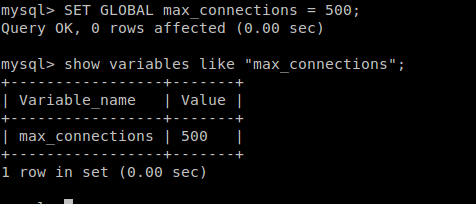
To increase the max_connections value, let’s say 500, run this command:

SET GLOBAL max_connections = 500;


The command takes effect right after you execute it, but it only applies to the current session. If you
want it to be permanent until you re-adjust it the next time, you have to edit the configuration file
my.cnf (normally it’s stored in /etc/my.cnf).

Under the [mysqld] section add the following line:

max_connections = 500
Then restart the MySQL server to take effect.

One thing to keep in mind that there is no hard limit to setting up maximum max_connections value,
but increasing it will require more RAM to run. The number of maximum connections permitted has
to be calculated based on how much RAM you have and how much is used per connection. In many
cases, if you run out of usable disc space on your server partition or drive, MySQL might also return
this error.

The maximum number can be estimated by the formula:

max.connection=(available RAM-global buffers)/thread buffers
So increase it with caution.


Sunday, January 20, 2019

How to Check MySQL Database & Tables Size on linux ?

MySQL is a Relational Database Management System, widely used as a database system for Linux systems. This article will help you to calculate the size of tables and database in MySQL or MariaDB servers though SQL queries. MySQL stored all the information related to tables in a database in the information_schema database. We will use the information_schema table to find tables and databases size.


How to find each data base size ?


Check ALL Databases Size in MySQL


Using mysql query


SELECT table_schema AS "Database", SUM(data_length + index_length) / 1024 / 1024 AS "Size (MB)" FROM
information_schema.TABLES GROUP BY table_schema;


Sample output:


mysql> SELECT table_schema AS "Database", SUM(data_length + index_length) / 1024 / 1024 AS "Size (MB)" FROM
information_schema.TABLES GROUP BY table_schema
   -> ;
+--------------------+------------+
| Database           | Size (MB) |
+--------------------+------------+
| information_schema | 0.00878906 |
| mylabdb            | 0.00111008 |
| mysql              | 0.68704987 |
| performance_schema | 0.00000000 |
+--------------------+------------+


mysql> SELECT
   ->   table_schema 'Database Name',
   ->   SUM(data_length + index_length) 'Size in Bytes',
   ->   ROUND(SUM(data_length + index_length) / 1024 / 1024, 2) 'Size in MiB'
   -> FROM information_schema.tables
   -> GROUP BY table_schema;


Check Single Table Size in MySQL Database


To find out the size of a single MySQL database called mylabdb (which displays the size of all tables in it) use the
following mysql query.


mysql> SELECT table_name AS "Table Name",ROUND(((data_length + index_length) / 1024 / 1024),
2) AS "Size in (MB)" FROM  information_schema.TABLES WHERE table_schema = "mylabdb"
ORDER
BY (data_length + index_length) DESC;


Finally, to find out the actual size of all MySQL database files on the disk (filesystem), run the
du command below.


sudo du -h /var/lib/mysql


Friday, June 30, 2017

how to find physical location of mysql database under linux?

If you are using MySQL, and want to know the actual physical path of MySQL, where MySQL stores the db, and its information files and the amount of data for MySQL data and MySQL index files i.e. table_name.MYD and table_name.MYI respectively, below is the easy solution.

Default MySQL Physical Directory Path is
/var/lib/mysql/ or /var/db/mysql

You can open it in Terminal  (using sudo or root access). Once you get into the folder, you can easily find the folders which are actually your database names, and in the database name folders, you can find the table names, having MYD and MYI extensions, which are actually your data and index files.


You can use the following command to locate MySQL datadir:

Method 1:

deba@linuxforfreshers.com>>grep datadir /etc/mysql/my.cnf

Sample output
datadir                        = /var/lib/mysql

Method 2:


deba@linuxforfreshers.com>>ps -eo cmd,args | grep mysql

Sample output:

/bin/sh /usr/bin/mysqld_saf /bin/sh /usr/bin/mysqld_safe --datadir=/var/lib/mysql --socket=/var/lib/mysql/mysql.sock --log-error=/var/log/mysqld.log --pid-file=/var/run/mysqld/mysqld.pid --user=mysql
/usr/libexec/mysqld --based /usr/libexec/mysqld --basedir=/usr
--datadir=/var/lib/mysql --user=mysql --pid-file=/var/run/mysqld/mysqld.pid --skip-external-locking --socket=/var/lib/mysql/mysql.sock


Method 3:

mysql -u root -p

mysql> select @@datadir;
+-----------------+
| @@datadir       |
+-----------------+
| /var/lib/mysql/ |
+-----------------+
1 row in set (0.00 sec)


This output confirms that MySQL is configured to use the default data directory, /var/lib/mysql/.

Monday, June 19, 2017

How create Mysql User, Database and set privileges to user on linux?

How create Mysql User, Database and set privileges to user

[ravi@linuxforfreshers.com~]$ mysql –u root –p
password:

mysql> create user 'ravi'@'localhost' identified by '123456';

mysql> create database if not exists `ravidb`;

mysql> grant all on ravidb.* to ravi@linuxforfreshers.com identified by "123456" with grant option;

[ravi@linuxforfreshers.com~]$ mysql ravidb -u ravi -p

mysql> show databases;


mysql> use ravidb;

Thursday, November 3, 2016

How to check which port number mysql server is running on linux ?

Method 1:

To find a listener on a port, do this:

root@linuxforfreshers.com:~$netstat -tln | grep 3306
tcp        0      0 127.0.0.1:3306          0.0.0.0:*               LISTEN     

Or

root@linuxforfreshers.com:~$netstat -tlpn | grep mysql
tcp        0      0 127.0.0.1:3306          0.0.0.0:*               LISTEN      870/mysqld


Method 2:

root@linuxforfreshers.com:~$grep port /etc/mysql/my.cnf
# One can use all long options that the program supports.
# It has been reported that passwords should be enclosed with ticks/quotes
port                 = 3306

Method 3:

Using Mysql Query
root@linuxforfreshers.com:~$  mysql –u username –p password

mysql> SHOW GLOBAL VARIABLES LIKE 'PORT';
+---------------+-------+
| Variable_name | Value |
+---------------+-------+
| port          | 3306  |


+---------------+-------+