Saturday, December 5, 2015

postfix interview questions answers in linux ?

Q:1 What is postfix and default port used for postfix ?

Ans: Postfix is a open source MTA (Mail Transfer agent) which is used to route & deliver emails. Postfix is the alternate of widely used Sendmail MTA. Default port for postfix is 25.

 Q:2 What is the difference between Postfix & Sendmail ?
Ans:  Postfix uses a modular approach and is composed of multiple independent executables. Sendmail has a more monolithic design utilizing a single always running daemon.
 Q:3 What is MTA and it’s role in mailing system ?
Ans: MTA Stands for Mail Transfer Agent.MTA receives and delivers email. Determines message routing and possible address rewriting. Locally delivered  messages are handed off to an MDA for final delivery. Examples Qmail, Postfix, Sendmail
Q:4 What is MDA ?
Ans: MDA stands for Mail Delivery Agent. MDA is a Program that handles final delivery of messages for a system’s local recipients. MDAs can often filter or categorize messages upon delivery. An MDA might also determine that a message must be forwarded to another email address. Example Procmail
 Q:5 What is MUA ?
Ans: MUA stands for Mail User Agent. MUA is aEmail client software used to compose, send, and retrieve email messages. Sends messages through an MTA. Retrieves messages from a mail store either directly or through a POP/ IMAP server. Examples Outlook, Thunderbird, Evolution.

 Q:6 What is the use of  postmaster account in Mailserver ?
Ans: An email administrator is commonly referred to as a postmaster. An individual with postmaster responsibilities makes sure that the mail system is working correctly, makes configuration changes, and adds/removes email accounts, among other things. You must have a postmaster alias at all domains for which you handle email that directs messages to the correct person or persons .
 Q:7 What are the important daemons in postfix ?
Ans : Below are the lists of impportant daemons in postfix mail server :
master :The master daemon is the brain of the Postfix mail system. It spawns all other daemons.
smtpd: The smtpd daemon (server) handles incoming connections.
smtp :The smtp client handles outgoing connections.
qmgr :The qmgr-Daemon is the heart of the Postfix mail system. It processes and controls all messages in the mail queues.
local : The local program is Postfix’ own local delivery agent. It stores messages in mailboxes.
 Q:8 What are the configuration files of postfix server ?
Ans: There are two main Configuration files of postfix :
/etc/postfix/main.cf : This file holds global configuration options. They will be applied to all instances of a daemon, unless they are overridden in master.cf
/etc/postfix/master.cf  : This file defines runtime environment for daemons attached to services. Runtime behavior defined in main.cf may be overridden by setting service specific options.
 Q:9 How to restart the postfix service & make it enable across reboot ?

Ans: Use this command to restart service “ Service postfix restart” and to make the service persist across the reboot, use the command “ chkconfig postfix on”.
Q:10 How to check the mail’s queue in postfix ?

Ans: Postfix maintains two queues, the pending mails queue, and the deferred mail queue,the deferred mail queue has the mail that has soft-fail and should be retried (Temporary failure), Postfix retries the deferred queue on set intervals (configurable, and by default 5 minutes)

To display the list of queued mails :

# postqueue -p

To Save the output of above command :

# postqueue -p > /mnt/queue-backup.txt

Tell Postfix to process the Queue now

# postqueue -f

 Q:11 How  to delete mails from the queue in postfix ?

Ans:  Use below command to delete all queued mails

# postsuper -d ALL

To delete only deferred mails from queue , use below command

# postsuper -d ALL deferred

 Q:12 How to check postfix configuration from the command line ?

Ans: Using the command ‘postconf -n‘  we can see current configuration of postfix excluding the lines which are commented.
 Q:13 Which command is used to see live mail logs in postfix ?
Ans: Use the command  ‘tail -f /var/log/maillog’ or ‘tailf /var/log/maillog’
 Q:14 How to send a test mail from command line ?
Ans: Use the below command to send a test mail from postfix itself :

# echo “Test mail from postfix” | mail -s “Plz ignore” info@something.com

 Q:15  What is an Open mail relay ?

Ans: An open mail relay is an SMTP server configured in such a way that it allows anyone on the Internet to send e-mail through it, not just mail destined to or originating from known users.This used to be the default configuration in many mail servers; indeed, it was the way the Internet was initially set up, but open mail relays have become unpopular because of their exploitation by spammers and worms.

 Q:16 What is relay host in postfix ?

Ans: Relay host is the smtp address , if mentioned in postfix config file , then all the incoming mails be relayed through smtp server.

 Q:17 What is Greylisting ?

Ans: Greylisting is a method of defending e-mail users against spam. A mail transfer agent (MTA) using greylisting will “temporarily reject” any email from a sender it does not recognize. If the mail is legitimate the originating server will, after a delay, try again and, if sufficient time has elapsed, the email will be accepted.

 Q:18  What is the importance of SPF records in  mail servers ?

Ans: SPF (Sender Policy Framework) is a system to help domain owners specify the servers which are supposed to send mail from their domain. The aim is that other mail systems can then check to make sure the server sending email from that domain is authorized to do so – reducing the chance of email ‘spoofing’, phishing schemes and spam!

 Q:19 What is the use of Domain Keys(DKIM) in mail servers ?

Ans: DomainKeys is an e-mail authentication system designed to verify the DNS domain of an e-mail sender and the message integrity. The DomainKeys specification has adopted aspects of Identified Internet Mail to create an enhanced protocol called DomainKeys Identified Mail (DKIM).

 Q:20 What is the role of  Anti-Spam SMTP Proxy (ASSP) in mail server ?

Ans: ASSP is a gateway server which is install in front of your MTA and implements auto-whitelists, self learning Bayesian, Greylisting, DNSBL, DNSWL, URIBL, SPF, SRS, Backscatter, Virus scanning, attachment blocking, Senderbase and multiple other filter methods


what is meant by sudo in linux ?

what is mean by sudo?


sudo  is a program for linux-like computer operating systems that allows users to run programs with the security privileges of another user, by default the superuser.

Who can execute ‘sudo’?

We can run ‘visudo‘ to add/remove the list of users who can execute ‘sudo‘


The sudo list looks like the below string, by default:

root ALL=(ALL) ALL


Granting sudo Access

In many situation, System Administrator, specially new to the field finds the string “root ALL=(ALL) ALL” as a template and grants unrestricted access to others which may be potentially very harmful.

Editing ‘visudo’ file to something like the below pattern may really be very dangerous, unless you believe all the listed users completely.

root ALL=(ALL) ALL
adam ALL=(ALL) ALL
tom ALL=(ALL) ALL
mark ALL=(ALL) ALL


Parameters of sudo

A properly configured ‘sudo‘ is very flexible and number of commands that needs to be run may be precisely configured.

The Syntax of configured ‘sudo‘ line is:

root       ALL        = (ALL)            ALL

Username  Machine name=(Effective user) command

The above Syntax can be divided into four parts:

    User_name: This is the name of ‘sudo‘ user.

    Machine_name: This is the host name, in which ‘sudo‘ command is valid. Useful when you have lots of host machines.

    (Effective_user): The ‘Effective user’ that are allowed to execute the commands. This column lets you allows users to execute System Commands.

    Command: command or a set of commands which user may run.


You have a user ‘tom‘ which is supposed to execute system command as user other than root.


tom ALL=(ALL) ALL


How to add some services to a particular user?

tom ALL=(ALL)  /usr/sbin/fdisk,/usr/sbin/useraddd,/usr/bin/passwd


How about executing a ‘sudo‘ command without entering password?

We can execute a ‘sudo‘ command without entering password by using ‘NOPASSWD‘ flag.

adm ALL=(ALL) NOPASSWD: ALL

adm ALL=(ALL) NOPASSWD: /usr/sbin/fdisk,/usr/sbin/useradd,/usr/bin/passwd


what is meant by umask in linux?

UMASK (User Mask or User file creation MASK) is the default permission or base permissions given when a new file (even folder too, as Linux treats everything as files) is created on a Linux machine. Most of the Linux distros give 022 (0022) as default UMASK. In other words, it is a system default permissions for newly created files/folders in the machine.

For root user default umask value is 022.

For normal user default umask value is 0002


How to check the umask value of the current user (root) ?

using umask to can find the default value

[root@Rhel ~]# umask
0022


when you create a directory default directory permissions is


0777
0022
-------
0755
-------


[root@Rhel ~]# ls -ld /vasu
drwxr-xr-x. 2 root root 6 Nov 24 15:06 /vasu
[root@Rhel ~]#


when you (root)  create a any file the default file permission are 644


[root@Rhel ~]# ls -l
-rw-r--r--. 1 root root 0 Nov 24 15:06 a


how to check the umask value of the normal user (student)?

[student@Rhel ~]$ umask
0002
[student@Rhel ~]$


when you create a directory default directory permissions is

0777
0002
-------
0775
-------

[student@Rhel ~]$ mkdir vasu
[student@Rhel ~]$ ls -l
total 0
drwxrwxr-x. 2 student student 6 Nov 24 15:17 vasu


when you  create a any file the default file permission are 664

[student@Rhel vasu]$ touch a
[student@Rhel vasu]$ ls -l
total 0
-rw-rw-r--. 1 student student 0 Nov 24 15:19 a
[student@Rhel vasu]$


umask and level of security

The umask command be used for setting different security levels as follows:

umask value
Security level
Effective permission (directory)
022
Permissive
755
026
Moderate
751
027
Moderate
750
077
Severe
700

For more information about the umask read the man page of bash or ksh or tcsh shell:

man bash
help umask

man chmod

What is a sticky Bit and how to set it in Linux?

What is Sticky Bit?


Sticky Bit is mainly used on folders in order to avoid deletion of a folder and its content by other users though they having write permissions on the folder contents. If Sticky bit is enabled on a folder, the folder contents are deleted by only owner who created them and the root user. No one else can delete other users data in this folder(Where sticky bit is set). This is a security measure to avoid deletion of critical folders and their content(sub-folders and files), though other users have full permissions.

How can I setup Sticky Bit for a Folder?

Sticky Bit can be set in two ways

  1. Symbolic way (t,represents sticky bit)
  2. Numerical/octal way (1, Sticky Bit bit as value 1)

Checking if a folder is set with Sticky Bit or not?

Use ls -ld to check if the x in others permissions field is replaced by t or T

Use chmod command to set Sticky Bit on Folder: /example

Symbolic way:

chmod o+t  /example
or
chmod +t /example

Let me explain above command, We are setting Sticky Bit(+t) to folder /example by using chmod command.

Numerical way:
chmod 1757 /example

ll -ld /example/
drwxr-xrwt. 2 root root 6 Nov 27 12:07 /example/


Here in 1757, 1 indicates Sticky Bit set, 7 for full permissions for owner, 5 for read and execute permissions for group, and full permissions for others.

how to delete sticky Bit on Folder:/example

Symbolic way:

chmod o-t /example
or
chmod -t /example

Numerical way:

chmod 0757 /example


ll -ld /example/

drwxr-xrwx. 2 root root 6 Nov 27 12:07 /example/


how to set SGID in linux

What is SGID?


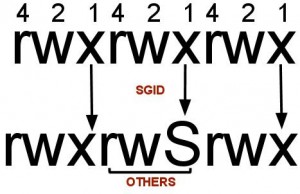
SGID (Set Group ID up on execution) is a special type of file permissions given to a file/folder. Normally in Linux/Unix when a program runs, it inherits access permissions from the logged in user. SGID is defined as giving temporary permissions to a user to run a program/file with the permissions of the file group permissions to become member of that group to execute the file. In simple words users will get file Group’s permissions when executing a Folder/file/program/command.

SGID is similar to SUID. The difference between both is that SUID assumes owner of the file permissions and SGID assumes group’s permissions when executing a file instead of logged in user inherit permissions.


How can I setup SGID for a file?


SGID can be set in two ways

1) Symbolic way (s)

2) Numerical/octal way (2, SGID bit as value 2)

Use chmod command to set SGID on file: file2.txt

Symbolic way:

chmod g+s file2.txt

Let me explain above command we are setting SGID(+s) to group who owns this file.

Numerical way:

chmod 2750 file2.txt

Here in 2750, 2 indicates SGID bitset, 7 for full permissions for owner, 5 for read and execute permissions for group, and no permissions for others.


How can I check if a file is set with SGID bit or not?

Use ls –l to check if the x in group permissions field is replaced by s or S

For example: file2.txt listing before and after SGID set


[root@rhel~]# ls -l
-rwxr-s---. 1 root root 0 Nov 24 14:54 file2.txt


How can I remove SGID bit on a file/folder?


[root@rhel ~]# chmod g-s file2.txt
[root@rhel ~]# ls -l
-rwxr-x---. 1 root root 0 Nov 24 14:54 file2.txt